📖 Overview
Ciderbox is a fork of crabbox stripped
to a single provider: Apple's native container CLI. Instead of routing
through Docker Desktop, OrbStack, or a remote broker, ciderbox spins up real Linux VMs
directly on your Apple Silicon hardware — using the same hypervisor that powers macOS virtualization.
The result is a tight local loop: init a project, write a .ciderbox.yaml,
run ciderbox compile-test, and get a pass/fail result from an isolated
Linux VM. Add more distros when you need a matrix — no cloud account, no per-minute billing,
no daemon socket to babysit.
What you get
$HOME is visible inside VMs✅ Requirements
| Requirement | Detail |
|---|---|
| Apple Silicon | M1, M2, M3, M4 — any Apple Silicon Mac |
| macOS 26+ | Required for direct container IP reachability |
container CLI | Apple's open-source VM tool — see install instructions below |
| Homebrew | Required for adding the ciderbox tap |
| Go 1.22+ | Only if building from source |
Install Apple container CLI
# Download the latest .pkg from GitHub releases
$ open https://github.com/apple/container/releases

# Install and start the system service
$ sudo installer -pkg container-*.pkg -target /
$ container system start

# Verify
$ container --version
📦 Install
Ciderbox Console (recommended)
The easiest way to use Ciderbox. Download the Mac app with everything bundled.
$ curl -LO https://github.com/mentholmike/ciderbox/releases/download/v1.2.0/Ciderbox-Console.dmg
$ open Ciderbox-Console.dmg
# Drag Ciderbox Console.app to Applications, then open it
Homebrew
For CLI-only use or automation:
$ brew tap mentholmike/ciderbox
$ brew install ciderbox
From source
$ git clone https://github.com/mentholmike/ciderbox.git
$ cd ciderbox
$ go build -o ciderbox ./cmd/ciderbox
$ sudo install -m 0755 ciderbox /usr/local/bin/ciderbox
Verify the install
$ ciderbox doctor
# checks: Apple container CLI, SSH keys, macOS version
🚀 Quick Start
Run this after ciderbox --version works locally from the source install above.
1 — Start in any project directory
$ mkdir -p /tmp/cider-demo
$ cd /tmp/cider-demo
$ ciderbox init
# creates .ciderbox.yaml in the directory where you ran it
Ciderbox treats the current directory as the project root. During a run, it syncs that
directory into the VM under a workdir like /work/ciderbox/cider-demo, then
executes your command there.
2 — Use one distro first
Edit .ciderbox.yaml:
project: cider-demo
compileTest:
  distros:
    - name: debian
      image: debian:bookworm
  command: "pwd && uname -a"
  parallel: false
commands:
  build: "make build"
3 — Run the test environment
$ ciderbox compile-test
# sync: /tmp/cider-demo -> /work/ciderbox/cider-demo
# ubuntu ✓ passed
# /work/ciderbox/cider-demo
# Linux ciderbox-abc123 ... aarch64 GNU/Linux
4 — Run a one-off command
$ ciderbox run -- pwd
# /work/ciderbox/cider-demo
5 — Knock it down
$ ciderbox chop
# terminated active ciderbox VMs
🧪 Distros Tested / Supported
Start with one distro while you are proving the loop. When the command is stable, add the
rest to compileTest.distros and turn on parallel: true.
| Name | Image | Package manager |
|---|---|---|
| Debian | debian:bookworm | apt-get |
| Ubuntu | ubuntu:26.04 | apt-get |
| Alpine | alpine:latest | apk |
| Fedora | fedora:latest | dnf |
| Rocky Linux | rockylinux:9 | dnf / yum |
| openSUSE Leap | opensuse/leap:latest | zypper |
compileTest:
  distros:
    - name: debian
      image: debian:bookworm
    # - name: ubuntu
    #   image: ubuntu:26.04
    # - name: alpine
    #   image: alpine:latest
    # - name: fedora
    #   image: fedora:latest
    # - name: rocky
    #   image: rockylinux:9
  command: "make test"
  parallel: true
⌨️ Command Reference
.ciderbox.yaml in the current directorybuild config block⚙️ Configuration
All project config lives in .ciderbox.yaml at your repo root. Run ciderbox init to generate a starter file.
Starter schema
project: my-project

compileTest:
  distros:
    - name: debian
      image: debian:bookworm
  command: "make test"
  parallel: false
  dependencies: [build-essential, libssl-dev]  # optional

commands:
  build: "make build"

run:
  provider: apple-container
  image: debian:bookworm
Runtime dependencies
The dependencies key installs packages at VM boot before your command runs. Ciderbox detects the available package manager and supports apt-get, apk, dnf, yum, pacman, and zypper. On Debian/Ubuntu this translates to:
apt-get update && apt-get install -y --no-install-recommends \
  build-essential libssl-dev python3 && make test
Alpine uses apk add, Fedora/Rocky use dnf or yum, and openSUSE uses zypper. See Distros Tested / Supported when you want to expand from one image to a matrix.
🖥️ Ciderbox Console UI
Ciderbox Console is a native Mac app that provides a browser-based UI for managing your containers and orchards. No command line required — everything from planting trees to harvesting results is visual.
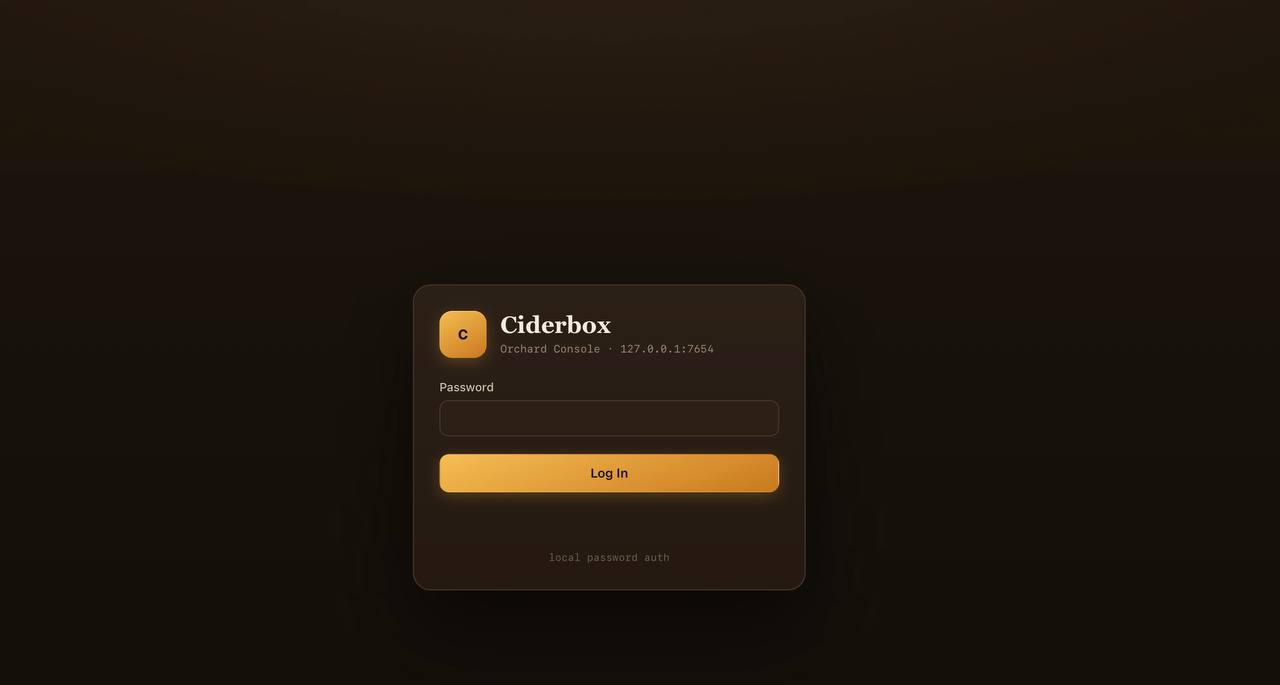
Login
The console runs locally on 127.0.0.1:7654 with password authentication. On first launch, you set a password through the setup flow. No accounts, no cloud — just your machine.
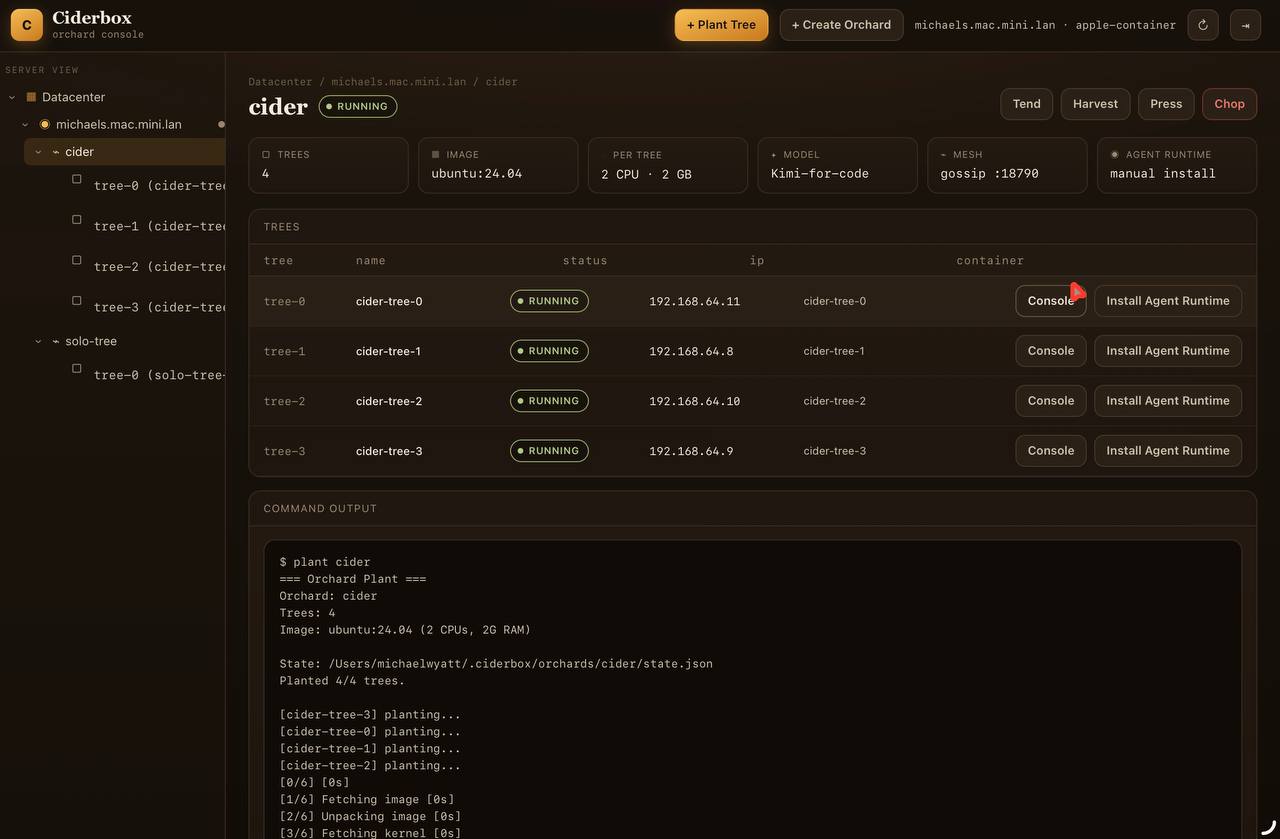
Dashboard
The main dashboard shows your orchards (swarms of containers) and individual trees (VMs). Each tree gets its own IP address, status, and quick-action buttons. The sidebar provides a hierarchical view: Datacenter → Node → Orchard → Tree.
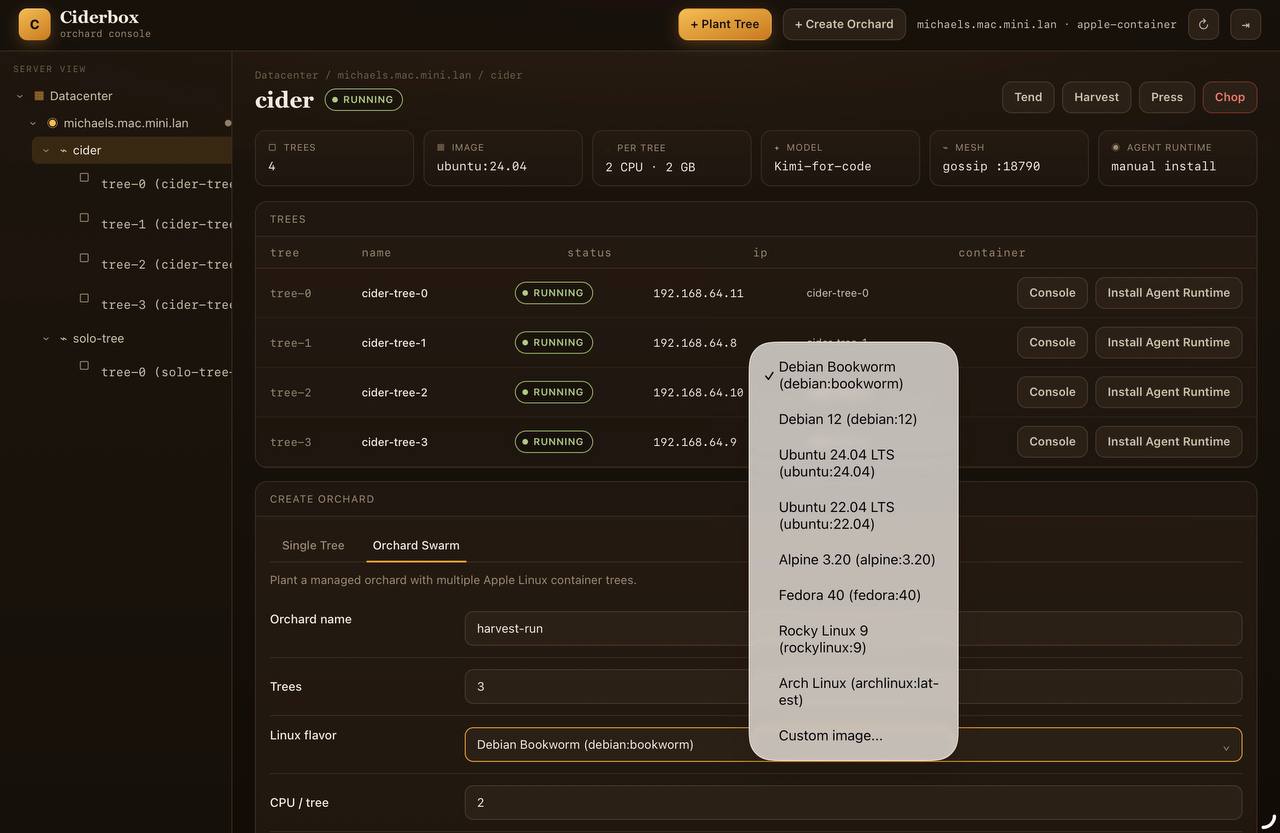
Creating Orchards
Click + Plant Tree for a single container, or + Create Orchard for a managed swarm. Choose from pre-configured Linux images — Debian, Ubuntu, Alpine, Fedora, Rocky, Arch — or specify a custom image. Configure CPU, memory, and mesh topology per tree.
Console & Terminal
Every tree has a Terminal button that opens a real inline terminal. Commands run directly inside the VM as root — no SSH needed. The terminal features:
- Real inline terminal — dark terminal with proper prompt, input line at bottom, output above
- No re-renders — output appends to the terminal, page never refreshes, focus stays on input
- Real-time streaming — stdout, stderr, and system messages appear instantly as they arrive
- ANSI color support — colored output from commands is preserved in the terminal
- Command history — press ↑/↓ to navigate previous commands, persistent across sessions
- Busy indicator — spinner on submit button, "running" status, input disabled during execution
- Auto-scroll — terminal automatically scrolls to show latest output
Orchard Mechanics
The orchard commands follow a gardening metaphor. Each action maps to a specific lifecycle operation:
Visual Feedback & Notifications
The console provides clear visual feedback for all operations:
- Toast notifications — bottom-left popups for success, error, and info messages
- Loading spinners — buttons show spinners during operations, disabled until complete
- Graft status indicators — ✓ on grafted trees, 🪜 button on ungrafted trees, banner when orchard needs grafting
- Command Output panel — bottom panel shows stdout, stderr, and timing for all operations
- Live status dots — green for running, amber for provisioning, red for errors
🌿 Orchard — AI Agent Swarm
Orchard is a swarm management layer built on top of ciderbox VMs. It spins up a fleet of identical Linux VMs ("trees"), installs an AI agent runtime on each, and coordinates distributed workloads across them.
Demo — start to finish
$ mkdir -p /tmp/orchard-demo
$ cd /tmp/orchard-demo
$ ciderbox orchard init
$ ciderbox orchard plant
# Planted 1/1 trees.

$ ciderbox orchard graft --all
# installs Node 22 + OpenClaw, writes identity + openclaw.json
# validates OpenClaw config inside each tree

$ ciderbox orchard run --task "inspect this tree"
$ ciderbox orchard run -- "inspect this tree"
$ ciderbox orchard harvest --output results.json
$ ciderbox orchard press --input results.json

$ ciderbox orchard chop --yes
# Chopped 1/1 trees.
.orchard.yaml
name: my-orchard
trees: 1
template:
  image: debian:bookworm
  cpus: 2
  memory: 2G
agent:
  identity: archimedes-clone
  skills: []
  model: CHANGE_ME
  command: cd "${ORCHARD_WORKSPACE:-/root/.openclaw/workspace}" && openclaw --log-level silent agent --local --agent main --message "$ORCHARD_TASK"
secrets:
  envFile: .orchid.env
  required: []
workspace:
  sync: true
  path: /work/ciderbox
What we verified
The v1.0 smoke planted a Debian tree through Apple Container, grafted Node 22 and
OpenClaw 2026.6.5, generated openclaw.json, ran
openclaw config validate inside the tree, then chopped the tree cleanly.
🔍 How It Works
Ciderbox is a Go CLI that wraps Apple's container binary.
There is no broker, no cloud account, no daemon socket — just your Mac's hypervisor.
Each VM gets its own IP address (no port mapping), boots from a cached image,
receives your project files via a tar stream, runs your command, and is torn down on exit.
The directory name becomes the default project workdir; if you run it from
/Users/alice/src/api, the VM side is effectively
/work/ciderbox/api. The run --keep flag keeps a VM alive for repeated checks or inspection.
🦀 vs Crabbox
Ciderbox is a focused fork — it does less, but does it without dependencies.
| Feature | crabbox | ciderbox |
|---|---|---|
| Runtime | Docker / OrbStack / Colima / cloud | Apple container CLI |
| Networking | Port publishing | Direct VM IPs |
| Target hardware | Cloud + local (x86 + ARM) | Apple Silicon Macs only |
| Broker required | ✓ for cloud providers | ✗ fully local |
| Compile-test matrix | not built-in | ✓ first-class |
| Config format | flags / env | .ciderbox.yaml |
| Cleanup | per-lease | chop — all at once |
| AI agent swarm | — | ✓ Orchard (v1.0) |
🛠 Troubleshooting
"apple-container provider not found"
The Apple container CLI isn't installed or the system service hasn't started.
$ sudo installer -pkg container-*.pkg -target /
$ container system start
$ ciderbox doctor   # should pass now
"container stopped before network address assigned"
The image exited before Ciderbox could prepare the workspace. Try a standard base image first, then add project dependencies through dependencies.
"No active ciderbox containers found" after chop
$ ciderbox chop
# terminates active ciderbox VMs
📋 Changelog
v1.2.1 — Terminal Rework
Real inline terminal replaces broken console UI. No more full-page re-renders that kill focus.
- Inline terminal — proper dark terminal with prompt at bottom, output streams above
- No re-renders — output appends to terminal, focus stays on input
- ANSI color support — preserves colored output from commands
- Command history — persistent ↑/↓ navigation across sessions
- Visual feedback — busy spinner, running indicator, disabled input during execution
- All operations — tend, harvest, press, chop, graft all have visual feedback and toasts
v1.2.0 — Ciderbox Console
Introducing Ciderbox Console — a native Mac app that wraps the CLI in a guided setup experience.
- Ciderbox Console.app — Native Mac app with bundled Apple Container installer
- Guided setup flow — Checks for runtime updates, asks background service permission, prompts to open UI
- Browser-based UI — Manage containers, orchards, and trees through a local web interface
- Linux image selection — Choose from Debian, Ubuntu, Alpine, Fedora, Rocky, Arch
- Live dashboard — Real-time updates for container status and health
v1.0.0 — Ciderbox is Born
Forked from crabbox to focus exclusively on Apple Silicon native containers. No Docker, no cloud brokers, no SSH bootstrap — just container run and go.
- Apple
containerCLI provider for sub-second Linux VM boots - Direct container IP networking — no port collision, no port publishing
compile-testcommand for first-class multi-distro testingorchardcommand suite for AI agent swarms.ciderbox.yamlproject configuration format- Homebrew tap:
brew tap mentholmike/ciderbox
v0.2.0 — Orchid
Added the orchard command suite for distributed AI agent workloads. Uses container exec (no SSH required for tree management). Supports swarm manifests via .orchard.yaml.
v0.1.0 — Initial Fork
Forked from crabbox, stripped to apple-container provider only. Added compile-test for multi-distro testing, build for single-distro builds, and chop cleanup. Fixed shell command parsing and added macOS 26 version gate.